A Rainy Afternoon, One Room, Three Shots
Plan a rainy-afternoon video with three distinct views that make one ordinary activity easy to follow, from its starting state to its visible finish.
How do you make a rainy-afternoon video feel like one small story rather than a set of unrelated clips? Plan three distinct views that follow the same activity, and let each view reveal a different part of the scene. Rain can set the mood, but the activity gives the viewer something to follow.
For a simple rainy-afternoon video, choose a task you can pause between takes, such as arranging postcards or setting a place at the table. Use a phone or camera you already have, and keep the room and materials manageable. The main planning challenge is not collecting enough angles; it is making each view useful on its own and clear in sequence.
Choose a readable activity
Pick an activity with visible materials and actions. Sorting a few postcards, preparing a cup of tea, or folding a blanket gives the camera something specific to show. A conversation or an action that happens outside the frame can be harder to follow without extra coverage.
Decide what the viewer needs to notice in each part. For a postcard scene, that might mean seeing the mixed cards, watching them get sorted, then seeing the finished groups. This is a coverage plan, not a demand that the task carry a dramatic message.
Keep the materials within reach and the action contained. If you are using a kettle, pour safely and keep the phone away from hot water. For a quieter setup, use postcards, paper, a basket, or another object that can be moved without risk.
Give each view a job
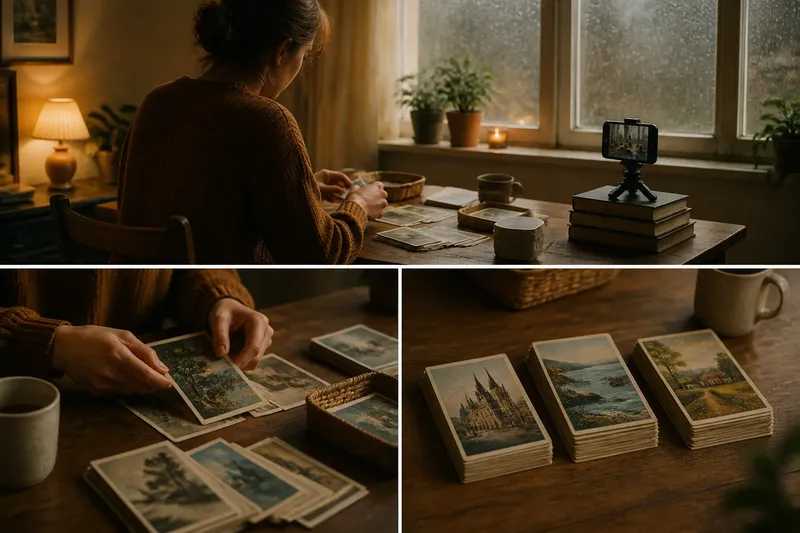
Think of the shots as three windows onto the same table. One shows where the action happens, one makes the important movement visible, and one lets the viewer inspect the result. Like labels on storage boxes, those different views help the audience sort out what they are seeing.
- Room view: Include the person, workspace, and starting arrangement. Check that the viewer can identify the activity; if the materials are too small to recognize, move the camera closer or arrange them more clearly.
- Action view: Frame the hands and the part of the task that changes the arrangement. If the movement is hidden by an arm or object, shift to the other side of the table; if it is already clear, keep the frame steady.
- Result view: Show the finished arrangement from a distance that makes its details readable. If the result is hard to distinguish from the starting view, adjust the objects or camera position; if the difference is clear, hold the composition rather than adding another angle.
Make the views distinct through distance or angle, not through unrelated camera movement. A wide room view, a closer view of the hands, and a final view of the arranged objects each answer a different question. Keep the same screen orientation throughout so the framing does not shift between vertical and horizontal.
Place the camera with care
Set the phone on a tripod, phone stand, or stable stack of books. Put it on a firm surface where it cannot be bumped, and check that the lens is not blocked. A fixed camera makes small actions easier to follow and avoids shaky footage.
Use the camera screen to check what enters the frame. Look for a bright window that pulls attention away, a mirror showing the camera, or an object that obscures the materials. If something distracts, move the camera or shift that item; there is no need to clear the whole room.
Tap the main subject on the screen if the camera focuses on the window or background. Avoid changing zoom during a take. If the shot needs a closer view, move the phone before recording and check the new frame.
Record in a simple order
Start with the room view while the materials are still arranged in their starting position. Record a short rehearsal and watch it once. If the workspace or starting layout is unclear, adjust the framing before continuing.
Next, record the action view. Let the clip include the movement that changes the arrangement, with a little stillness before and after so the edit has room to begin and end. If you miss the action, reset only what is needed and record that view again.
Record the result view last, after the activity is complete. Keep the camera still and leave the finished arrangement visible. If a sound interrupts the take, decide whether it distracts from the action; if it does, pause and record again, and if it fits the room, let it remain.
Before moving anything, play the clips in order. Check that the starting view, action, and result are all present. If one part is missing, record a replacement while the materials remain in place instead of adding decorative footage that does not clarify the scene.
Check the sequence as a whole
Compare the clips for continuity. Check that important objects do not jump to a new place without a visible action, and that the final arrangement matches what the action view showed. If a change is unexplained, record a brief connecting view or adjust the edit to remove the confusing jump.
Say you have a mixed stack of postcards, a clear patch of table, and a phone on a book stack. First, frame the table and cards so both are recognizable. Next, record your hands sorting the cards into groups. Then, film the groups from a closer angle with one card visible on top. When you review the sequence, the viewer should be able to connect the mixed stack, the sorting action, and the finished groups; if the last view instead shows the cards inside a drawer, replace it or show the action that puts them there.
Keep the camera position and lighting reasonably consistent between takes. If a window becomes much brighter or the room view shows objects that disappear in the action shot, decide whether the difference distracts; if it does, reposition or reshoot, and if it does not, continue with the clearest footage.
What should each shot show?
How long should each shot last?
Keep a clip long enough to show its job: the room view establishes the setup, the action view includes the meaningful movement, and the result view gives the viewer time to see the arrangement. Trim pauses that add nothing, but do not cut off the action or its result.
Does the rain need to appear?
No. Rain can show through a window or remain as quiet background sound, but it does not need to appear in every view. If the weather competes with the activity, keep it out of the frame.
What if the activity has no clear finish?
Choose a visible stopping point, such as the last card joining a group or the materials resting in a basket. If the task remains partly unfinished, frame the completed portion so viewers can tell what has been done.
Can one phone record all three views?
Yes. Record each view separately and move the phone between takes. If the activity can pause safely, a second device is unnecessary.
End on a clear image
Choose one final view and give it enough time to register. A finished arrangement, a cup beside an open book, or a person settling back at the table can all work if the image connects to the action. Avoid adding an extra shot of the rain after the sequence has already ended unless it contributes information the viewer still needs.
For a rainy-afternoon video, review the sequence once without stopping. Ask whether the room view establishes the setup, the action view shows what happened, and the final view makes the result legible. If one answer is no, replace or reframe that view; a clear sequence matters more than extra footage.