Storyboarding a Phone Video Before You Film
Storyboarding a phone video helps you plan clear shots with scrap paper, spot confusing cuts, and make a filming plan before you record.
How do you plan a phone video so viewers can follow it without drawing a polished comic? Storyboarding a phone video takes only scrap paper, a pencil, and a clear account of what happens on screen. Each box can show a different view, a change in action, or the moment one shot needs to connect to another.
Storyboard’s practical roots
A storyboard is a sequence of images used to plan scenes before filming or animation. Its purpose is practical: make the order and visual choices easier to discuss while they can still be changed on paper.
For an animation, drawings can show how a character’s pose or position changes between moments. For a filmed scene, panels can indicate what the camera sees, where an action begins, and how one view relates to the next. These are uses of the tool, not a claim about one universal origin or a single moment when it entered filmmaking.
On a small project, the same idea works with quick sketches. Treat the board like a paper map: it need not depict every detail, but it should make the route through the story legible.
What a board records
A useful storyboard distinguishes the information a viewer needs from details that can wait until filming. A panel might record:
- The subject and important object in the frame.
- The action that begins or ends in that shot.
- The camera view, such as a close view of a handwritten label.
- A sound that carries meaning, such as a phone notification.
- The connection to the next panel, such as a hand leaving the frame.
Skip details that do not help someone understand the shot. Use a label when a rough shape could be mistaken for another object, and use an arrow when movement matters.
Make panels readable
Fold a sheet of scrap paper into a grid or draw a row of boxes. Number the panels in story order, then leave space under each one for a short action note and, if needed, a sound cue.
Sketch with simple shapes. A rectangle can represent a book, a line can mark the edge of a desk, and an arrow can show a hand reaching into the frame. Add a framing note only when it changes what the viewer understands: “close on the torn corner” is clearer than “make it dramatic.”
Keep action and sound distinct. If the panel shows a cupboard closing and the sound matters, write “door clicks” beneath the drawing. If silence is part of the moment, note it; otherwise, leave the sound line empty.
Check the story’s order
Read the numbered panels without relying on their captions. Can you tell what is happening and what changes from one image to the next? Then cover the drawings and read the notes. A missing action may be clear in one pass and invisible in the other.
Check how objects and people move between views. If a hand carries a key out of one frame, the next panel should establish where the key goes. You do not need to draw every movement, but the viewer should not have to guess at a change that matters.
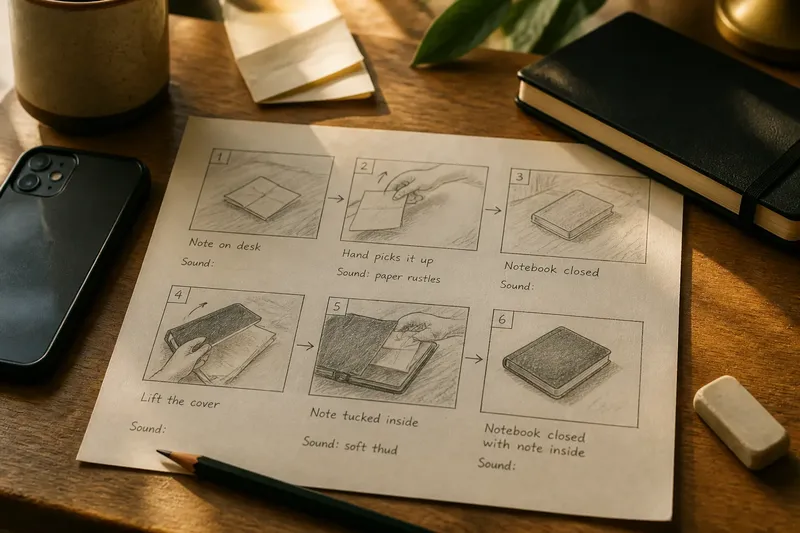
Say you have a phone, a desk, a closed notebook, and a folded note. Your first three panels show the note on the desk, a hand picking it up, and the notebook left closed. The destination is unclear. Add a panel showing the cover lift, then a close view of the note tucked inside; the resulting sequence shows both the action and its outcome without asking the viewer to infer an unseen transfer.
Phone video storyboarding questions?
Can I storyboard with a phone?
Yes. Draw panels on paper, or arrange rough frames in a notes or drawing app. Choose the method that lets you see the sequence at a glance and revise a panel quickly.
How detailed should each panel be?
Include only what distinguishes the shot and clarifies its action. If a reader cannot tell which object matters, add a label; if the action is already clear, skip extra drawing.
Should I film in panel order?
Not necessarily. You can record shots in the order that suits your location or setup, then use panel numbers to assemble the story in sequence. Keep the filming order separate from the story order in your notes.
What is the difference between a storyboard and a shot list?
A storyboard shows shots visually and in sequence; a shot list names the shots you plan to record. You can make a shot list from the panels by copying their numbers, framing notes, and essential actions.
Turn panels into decisions
Before filming, use each panel to make a clear choice. Check the frame, then decide what to do based on what you see:
- Check whether the main object is easy to identify; if it is, keep the panel simple, but if it blends into the background, add a label or change the planned view.
- Check whether the action’s starting position is clear; if it is, keep the opening frame, but if it is not, add a setup panel or rewrite the action note.
- Check whether the action’s result appears in a later panel; if it does, keep the sequence, but if it does not, add a result view or simplify the action.
- Check whether movement between panels makes sense; if it does, retain the order, but if it does not, add a connecting view or change the transition.
- Check whether a sound changes the viewer’s understanding; if it does, write the sound cue, but if it does not, leave it out and keep the filming plan lean.
- Check whether the planned camera view shows the important detail; if it does, keep that framing note, but if it does not, specify a closer or wider view.
For each panel you expect to record, note the object or gesture that must remain visible and what should be true by the end of the shot. If a phone, lamp, or tabletop limits the planned view, revise the panel before filming and make the new choice easy to recognize.
Revise without losing clarity
A storyboard is a working plan, not a promise to film every shot exactly as drawn. If a room or available device makes a panel impractical, change the view or action and update the notes. Keep the story order intact unless a different order makes the action easier to follow.
Do not redraw a panel simply to make it attractive. If someone misreads it, add a label, clarify the movement, or replace the sketch with a simpler one. Once the sequence communicates what the viewer sees and why the next shot follows, use it to guide filming and leave the paper nearby for changes.
Keep the board where you can check it while recording, and mark revisions beside the affected panel rather than relying on memory. That small habit keeps the final edit aligned with the story you planned, even when the actual shots change.